Guide
LED poster content formats guide
An LED poster is a portrait screen with a fixed number of pixels. Content looks sharp when it is made at that native size. This guide lists the sizes and explains how the content gets onto the poster and what happens without a network.
- Native pixel sizes
- Wi-Fi, LAN, USB
- 4G Optional
Native sizes for one poster
| Pitch | 640 × 1920 mm | 960 × 1920 mm | 1280 × 1920 mm (tri-fold open) |
|---|---|---|---|
| P1.25 | 512 × 1536 | 768 × 1536 | 1024 × 1536 |
| P1.538 | 416 × 1248 | 624 × 1248 | 832 × 1248 |
| P1.86 | 344 × 1032 | 516 × 1032 | 688 × 1032 |
| P2 | 320 × 960 | 480 × 960 | 640 × 960 |
| P2.5 | 256 × 768 | 384 × 768 | 512 × 768 |
| P3.076 | 208 × 624 | 312 × 624 | 416 × 624 |
For walls of several posters, add the widths: see the resolution guide.
Portrait canvas
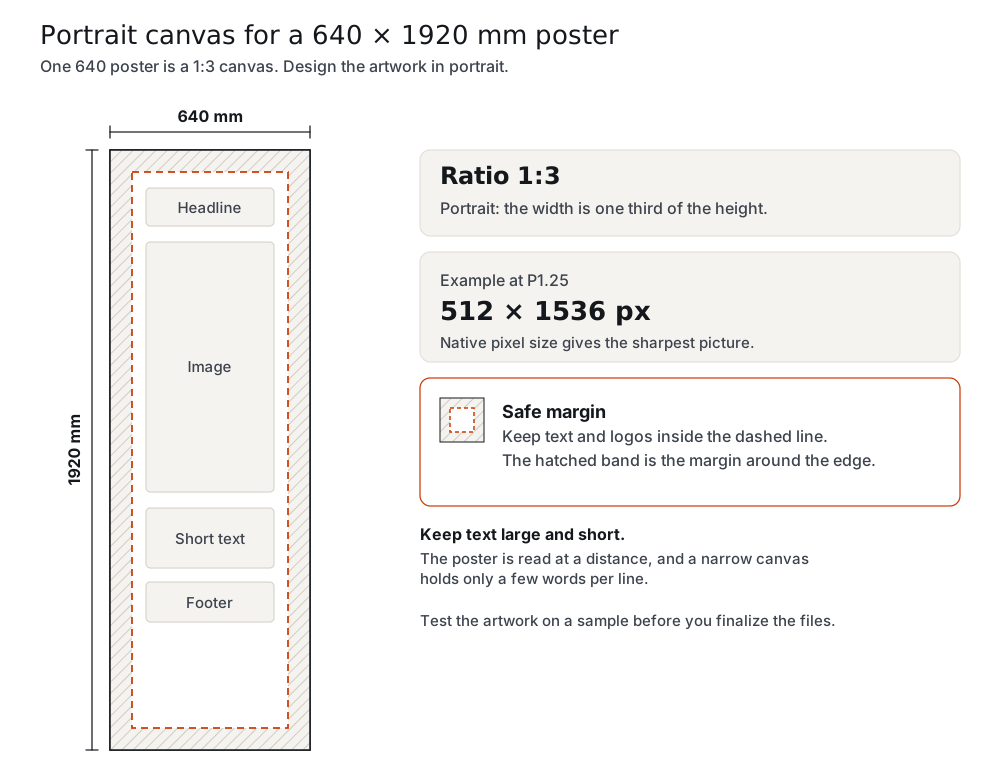
One 640 poster is a 1:3 canvas, one 960 poster 1:2. Design the artwork in portrait, and keep text large and short: the poster is read at a distance, and a 256-pixel-wide canvas at P2.5 holds only a few words per line.
How content gets onto the poster
Over Wi-Fi from a phone or laptop next to the poster, over LAN or from a USB stick. The poster stores the content and keeps playing it on its own, so it does not need a computer or Wi-Fi to show what is already loaded. 4G for remote updates is Optional. The control software is that of your control system (NovaStar with Mean Well PSU by default; Huidu or Colorlight as a lower-cost option).
Files and control software
The file types and the playlist options depend on the control software of the system you choose. Tell us your system, and we tell you what to prepare.
Walls
In a cascade, the whole wall is one canvas: two 640 posters make 1280 × 1920 mm and three make 1920 × 1920 mm. Design the artwork at the total pixel size. See the cascade guide.
Before you finalize
Run the content creation checklist and test the artwork on a sample.
Questions and answers
What size should my artwork be?
The native pixel size of your pitch and width, from the table above, for example 256 × 768 for a 640 poster at P2.5.
Can I use landscape content?
The poster is a portrait screen. A wall of three tri-fold posters is landscape (3840 × 1920 mm), but a single poster is portrait.
How do I change the content?
Over Wi-Fi from a phone or laptop, over LAN or from USB.
What if the Wi-Fi is down?
The poster keeps playing stored content. Wi-Fi, LAN or USB are needed only to change content.
Can I update remotely?
4G for remote updates is Optional.
Do I need a media player or a computer?
No. The player is built in, and the poster plays on its own with no computer connected.
Which video formats are supported?
That depends on the control software of your system. Tell us your system and we answer in the quotation.
Can two posters show different content?
Yes. Separate posters can play different content; a cascade shows one picture across several posters.
Request a quote
Request a quote and tell us the type, the pixel pitch, the quantity, the destination country and your control system (NovaStar with Mean Well PSU by default; Huidu or Colorlight as a lower-cost option). Price, MOQ and lead time are quoted per order. Samples are available.