Blog
Content without surprises: Wi-Fi, LAN, USB, 4G and offline
The most common worry is the network: what if the Wi-Fi goes down? The answer is simple. An LED poster stores its content and plays it on its own. A network is needed only to change the content.
- Wi-Fi
- LAN
- USB
- 4G Optional
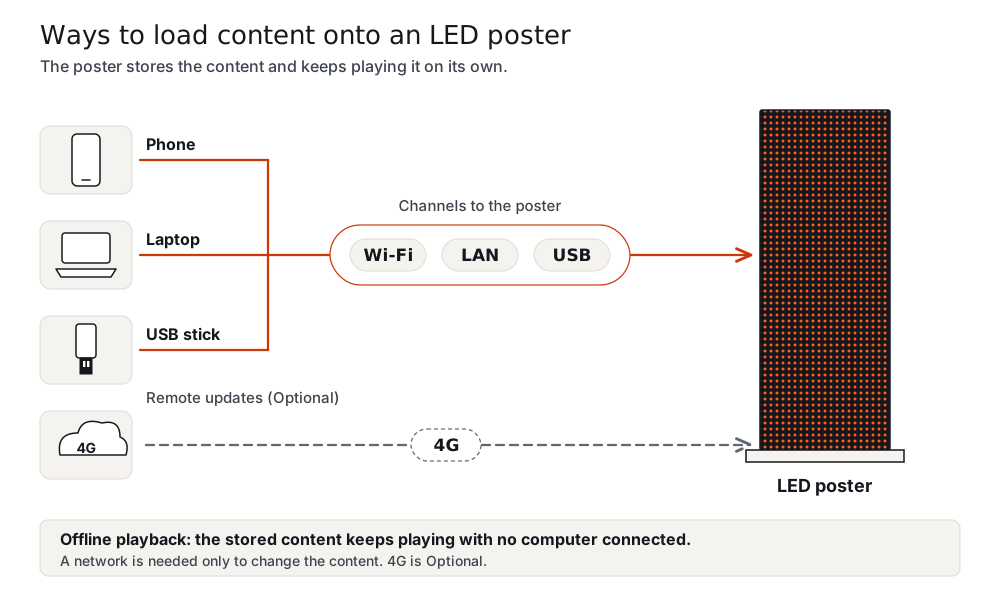
Four ways to load content
| Method | What it needs |
|---|---|
| Wi-Fi | A phone or laptop next to the poster |
| LAN | A cable to the network |
| USB | A USB stick, handy where the venue does not allow Wi-Fi |
| 4G | Optional, for remote updates |
Offline playback
The poster stores the content and keeps playing it, with no computer connected. If the network drops, the picture does not change. You will see the same loop until you update it.
Preparing the files
Make the artwork at the native pixel size of your pitch. The content formats guide lists the sizes and the content checklist gives eight steps.
Control systems
The software depends on your control system: NovaStar by default, or Huidu or Colorlight as a lower-cost option. See the controller guide.
Questions and answers
What happens if the Wi-Fi fails?
The poster keeps playing the stored content.
Do I need Wi-Fi at all?
Only to change content over Wi-Fi. LAN and USB work too.
Can the venue's network block it?
Use USB if the venue does not allow your poster on its network.
Is 4G included?
4G is Optional.
Can I change content remotely?
With the Optional 4G module.
Can I update from my phone?
Yes, over Wi-Fi next to the poster.
Does the poster need a computer?
No.
What happens if I do not update?
It keeps playing the stored content.
Request a quote
Request a quote and tell us the type, the pixel pitch, the quantity, the destination country and your control system (NovaStar with Mean Well PSU by default; Huidu or Colorlight as a lower-cost option). Price, MOQ and lead time are quoted per order. Samples are available.